The Ultimate Setup Guide for Your B8 OLED
Introduction
The LG B8 OLED remains a landmark entry in the world of home cinema, representing the point where elite organic light-emitting diode technology became accessible to a broader audience without compromising the fundamental qualities of the medium. Even as newer generations of displays enter the market, the B8 continues to serve as a reference point for deep blacks, infinite contrast, and vibrant color reproduction. For many enthusiasts, the B8 was their first foray into the "perfect black" ecosystem, and it remains a highly capable piece of hardware for 4K Blu-ray viewing, casual gaming, and streaming high-dynamic-range (HDR) content.
However, owning a premium display is only half the battle. Out of the box, industrial television sets are often configured for showroom floors—tuned for maximum brightness and aggressive cooling temperatures that do not reflect the intentions of cinematographers or game developers. To truly unlock the potential of the B8's 8 million self-lighting pixels, a meticulous setup is required. This guide is designed to navigate the complexities of the Alpha 7 processor, the intricacies of the WebOS interface, and the specific calibration settings necessary to achieve a natural, lifelike image that respects the technical limitations of OLED technology while maximizing its unique strengths.
Buyers typically gravitate toward the B8 for its price-to-performance ratio. While the higher-tier C8 of its era featured the more powerful Alpha 9 chip, the B8 utilized the Alpha 7, which still provided excellent motion handling and noise reduction for the vast majority of consumers. Understanding how to leverage this processing power without introducing artificial artifacts like "the soap opera effect" is essential for any owner looking to justify their investment in an OLED panel.
Detailed Product Analysis: The B8 OLED Experience
The heart of the B8 experience is the panel's ability to turn off pixels completely. Unlike traditional LED-backlit LCDs that rely on local dimming zones—which often result in "blooming" or "halos" around bright objects on dark backgrounds—the B8 offers pixel-level precision. This creates an image with unparalleled depth. When watching a film set in space, the stars appear as pinpricks of light against a void that is truly black, rather than a muddy gray. This fundamental characteristic influences every other aspect of the television’s performance, from color accuracy to perceived sharpness.
The Alpha 7 Intelligent Processor handles the heavy lifting regarding upscaling and image processing. While it lacks the quadruple-step noise reduction found in higher-end models, it excels at managing bitstream signals from streaming services like Netflix and Disney+. The processor works to smooth out gradients, which is particularly important in HDR content where "banding" in skies or shadows can often distract the viewer. In real-world use, users will notice that the B8 handles 1080p content with remarkable grace, making older Blu-rays look nearly as sharp as native 4K signals.
Brightness is the one area where OLED technology faces its greatest challenge compared to high-end QLED or Mini-LED displays. The B8 reaches a peak brightness that is sufficient for most controlled lighting environments, but it can struggle in rooms with significant direct sunlight. LG compensates for this with an excellent anti-reflective coating, but the setup process must account for the environment. Calibrating specific "ISF Expert" modes for both bright and dark rooms is a necessity to ensure the viewer isn't constantly reaching for the remote as the sun sets.
For gamers, the B8 is a stellar performer due to its near-instantaneous response time. Because the pixels switch states almost immediately, motion blur is significantly lower than on any LCD-based display. While it lacked the HDMI 2.1 features found in later models like the CX or C1, it still supports 4K gaming at 60Hz and 1080p gaming at 120Hz, making it a viable companion for last-generation and current-generation consoles. The input lag is impressively low in "Game Mode," ensuring that the delay between a controller input and the action on screen remains imperceptible to the average player.
Technical Specifications and Performance Metrics
| Feature | Specification / Value | Impact on Viewer |
|---|---|---|
| Panel Type | 4K WRGB OLED | Infinite contrast and perfect black levels. |
| Processor | Alpha 7 Intelligent Processor | Reliable upscaling and HDR tone mapping. |
| HDR Formats | Dolby Vision, HDR10, HLG | Wide compatibility with all major streaming platforms. |
| Refresh Rate | 120Hz Native | Smooth motion for sports and gaming. |
| Smart Platform | LG WebOS with ThinQ AI | Intuitive navigation and voice control integration. |
| Peak Brightness | ~700-800 nits (HDR) | Impactful highlights in dark to moderately lit rooms. |
Pros and Cons
- Pro: Infinite Contrast Ratio – The ability to turn off pixels entirely provides a level of immersion that LCD panels cannot match, especially for horror movies and sci-fi epics.
- Pro: Wide Viewing Angles – Unlike VA panels found in many high-end LEDs, the B8 maintains color accuracy and contrast even when viewed from extreme side angles, making it perfect for wide sectional seating.
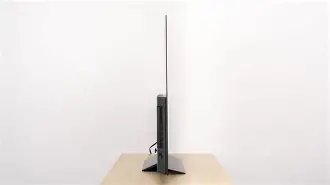
- Pro: Minimalist Design – The "Cinema Screen" design features an incredibly thin profile that looks striking when wall-mounted, with the electronics housed in a slim lower hump.
- Pro: Low Input Lag – A dedicated Game Mode ensures a responsive experience for competitive and casual gaming alike.
- Con: Risk of Permanent Burn-in – Because organic materials are used, static elements like news tickers or video game HUDs can eventually leave ghost images if the TV is pushed to max brightness for extended periods.
- Con: Alpha 7 vs Alpha 9 – While the Alpha 7 is capable, it does not feature the same advanced de-contouring and high-frame-rate (HFR) capabilities as its C8 sibling.
- OLED Light: Set this between 40 and 60. This controls the actual panel brightness without crushing blacks.
- Contrast: 85 is the sweet spot for maintaining detail in bright areas.
- Brightness: Leave this at 50; changing it even slightly can cause blacks to turn gray or shadow detail to vanish.
- Sharpness: 0. Modern 4K panels do not need artificial edge enhancement, which only adds "ringing" artifacts around objects.
- Color: 50 for natural saturation.
- Warmth: Set to Warm 2. This may initially look "yellow" if you are used to Vivid mode, but Warm 2 is the industry standard for D65 white point accuracy.
The Ideal Settings: Step-by-Step Optimization
Step 1: Out-of-the-Box Preparation
Before diving into the software menus, physical placement is paramount. OLEDs are reflective by nature. Try to avoid placing the B8 directly opposite a window. If wall-mounting, ensure you use a VESA-compliant bracket that can handle the weight distribution, as most of the weight is at the bottom. Once powered on, the first step is to disable "Energy Saving Step." While intended to reduce power consumption, it aggressively dims the screen based on ambient light, often ruining the HDR effect. Navigate to Settings > Picture > Energy Saving and turn it off.
Find top-rated TVs & Home Theater products at great prices.
See Deals →Step 2: SDR Calibration for Everyday Viewing
Standard Dynamic Range (SDR) content—such as cable TV, YouTube, and older movies—requires a subtle touch. For the most accurate "directors' intent" look, select ISF Expert (Dark Room).
Step 3: HDR and Dolby Vision Settings
When the B8 detects an HDR10 or Dolby Vision signal, it switches to a separate set of picture profiles. For HDR10, choose Cinema-User. Ensure that Dynamic Tone Mapping is turned ON. Since the B8 has a lower peak brightness than the 1000-4000 nits some movies are mastered at, Dynamic Tone Mapping allows the TV to analyze each frame and adjust the brightness curve to prevent "clipping" in bright highlights. For Dolby Vision, Cinema Home is a great choice for daytime viewing, while Cinema is best for a pitch-black environment.
Step 4: Managing Motion with TruMotion
Motion handling is a frequent point of contention. The B8’s instant response time can lead to "stutter" in 24fps film content because the transition between frames is so sharp. To mitigate this without creating a "soap opera effect," use the User setting in the TruMotion menu. Set De-Judder to 2 or 3 and De-Blur to 10. This provides a subtle smoothing that preserves the cinematic look of film while removing the jarring flicker during slow camera pans.
Buying Guide: Is the B8 Still Right for You?
In today’s market, the B8 is typically found on the used or refurbished market, or perhaps it is a centerpiece in a home that is being reconsidered for an upgrade. When evaluating this TV against modern alternatives, buyers must weigh the allure of "perfect blacks" against the conveniences of HDMI 2.1. If your primary use case is watching high-quality films and prestige TV dramas, the B8 remains an A-tier choice that outperforms almost any mid-range LED sold today.
Consider the room environment carefully. If you are setting up a dedicated media room or a basement "man cave," the B8 will shine brilliantly. The lack of backlighting means there is no "glow" in the room, creating a true theater-like atmosphere. Conversely, if the TV is for a sun-drenched kitchen or a bright living room where the news is on all day, the risks of glare and burn-in might outweigh the contrast benefits.
Another factor for buyers to consider is the sound. Like most ultra-thin televisions, the B8’s downward-firing speakers are adequate for dialogue but lack the low-end punch required for action movies. Budgeting for a dedicated soundbar or a 5.1 surround system is highly recommended to match the premium visual experience. For those looking at price, the B8 often represents an incredible bargain, offering 90% of the performance of flagship OLEDs at a fraction of the cost.
Real-World Use Cases
The Movie Enthusiast’s Sanctuary
Imagine sitting down to watch a 4K remaster of a classic film. On a traditional TV, the black bars at the top and bottom are a distracting dark navy blue. On the B8, they disappear into the bezel of the TV, becoming part of the room’s shadows. This "infinite contrast" allows colors to pop with a 3D-like quality. Users often report perceiving more detail in the image not because there are more pixels, but because the contrast between those pixels is so much higher.
Looking for the best TVs & Home Theater deals on Amazon?
Shop Amazon →The Casual Gamer’s Hub
While the B8 doesn't support the 4K/120Hz throughput of the newest consoles, it is a master of 60Hz gaming. Racing games like Forza or simulation games like Flight Simulator look spectacular thanks to the HDR highlights. The "Game Mode" on the LG B8 is remarkably clean, disabling unnecessary processing to ensure the lowest possible latency. For those who play in the evenings, the "Comfort Mode" or blue-light filters can be helpful to reduce eye strain during long sessions.
The Sports Fan’s Perspective
OLEDs are often praised for movies, but they are equally proficient for sports. The 120Hz native refresh rate means that a fast-moving football or a hockey puck doesn't leave a long trail across the screen. Because of the wide viewing angles, you can host a viewing party where people sitting on the far ends of the couch see the same vibrant colors and contrast as those sitting directly in front of the screen. This uniformity is a major advantage over LCD panels that often "wash out" when viewed from the side.
Long-Term Maintenance and Longevity
To ensure your B8 lasts for years, you must be mindful of the OLED panel’s health. LG has built-in several tools to prevent burn-in. The Pixel Refresher is a critical feature; it runs automatically after the TV has been off for a certain period, but you can also trigger a manual deep clean if you notice any temporary image retention. Always leave the TV plugged in when not in use—do not cut power at the wall—so the TV can perform its maintenance cycles in standby mode.
Additionally, using the Screen Shift feature is highly recommended. This moves the entire image by a few pixels at regular intervals, effectively spreading the wear across adjacent pixels and preventing static logos from "burning" into the organic material. Setting the Logo Luminance Adjustment to "High" will also detect static icons and dim them specifically, protecting the panel without ruining the brightness of the rest of the scene.
Conclusion
Setting up the LG B8 OLED is a rewarding process that bridges the gap between consumer electronics and professional-grade cinema performance. By moving away from the "Vivid" and "Standard" presets and embracing the ISF Expert and Cinema modes, owners can experience content exactly as it was intended to be seen. The balance of infinite contrast, wide viewing angles, and low input lag makes it a versatile powerhouse. While technology continues to march forward with higher brightness and more complex processing, the foundational excellence of the B8’s OLED panel ensures that it remains a centerpiece of high-fidelity entertainment. With the right configuration, this television will continue to provide an immersive, breathtaking window into the worlds of film, sport, and gaming for many years to' come.
Explore TVs & Home Theater Offers on Amazon
Compare prices and discover the best deals available right now.
Shop on Amazon →